Yes, it’s 2026 and I’m blogging about Active Directory. I’ll own that.
I’ve been sitting on this one for a while. Over the years I’ve occasionally done reporting on AD replication topology, and more recently with Claude Code, I wanted to finish up the script and finally publish. The underlying features aren’t new, and the credit for documenting them belongs to others (more on that below). What is new is the consolidated report and a script that ties it all together.
The Misconception
A surprising number of admins believe the minimum inter-site replication interval is 15 minutes. It’s not. That’s the default scheduled interval, and it’s trivially overridden by enabling change notification on your site links.
With change notification enabled, inter-site replication behaves like intra-site: a DC makes a change, waits 15 seconds (the holdback timer), then notifies its partners. Partners pull the change. No more waiting for the next scheduled cycle.
The setting exists on your site links right now, but it’s not surfaced in Active Directory Sites and Services. You have to set it on the options attribute directly, which is probably why so many people don’t know about it.
It’s also not 2005 anymore. The concern about “replication traffic over the WAN” made sense when branch offices were connected by 256K frame relay circuits. If your sites are connected by anything resembling a modern network, the additional traffic from change notification is negligible.
To be clear: this doesn’t change what replicates or the topology itself, just how quickly it happens. Anything that rides on AD replication benefits: AD-integrated DNS, group policy, group membership changes, certificate templates, DFS namespace configuration. If you’ve ever waited for a DNS record to show up on a DC in another site, this is the fix.
What the Script Does
Update-UseNotifyReplication.ps1 generates an HTML dashboard that shows the current state of change notification across your forest:
- Site links and whether
Use_Notify(option bit 0x1) is enabled on each - Replication connections and whether they’ve inherited notification settings from their site links
- Manual connections that won’t inherit notification (a common gotcha)
- Per-partition notification delay overrides (
msDS-Replication-Notify-First-DSA-DelayandmsDS-Replication-Notify-Subsequent-DSA-Delay) - Optionally, per-DC registry settings for notification timers and
AvoidPdcOnWan
It also calculates a health score based on what percentage of your site links have notification enabled.
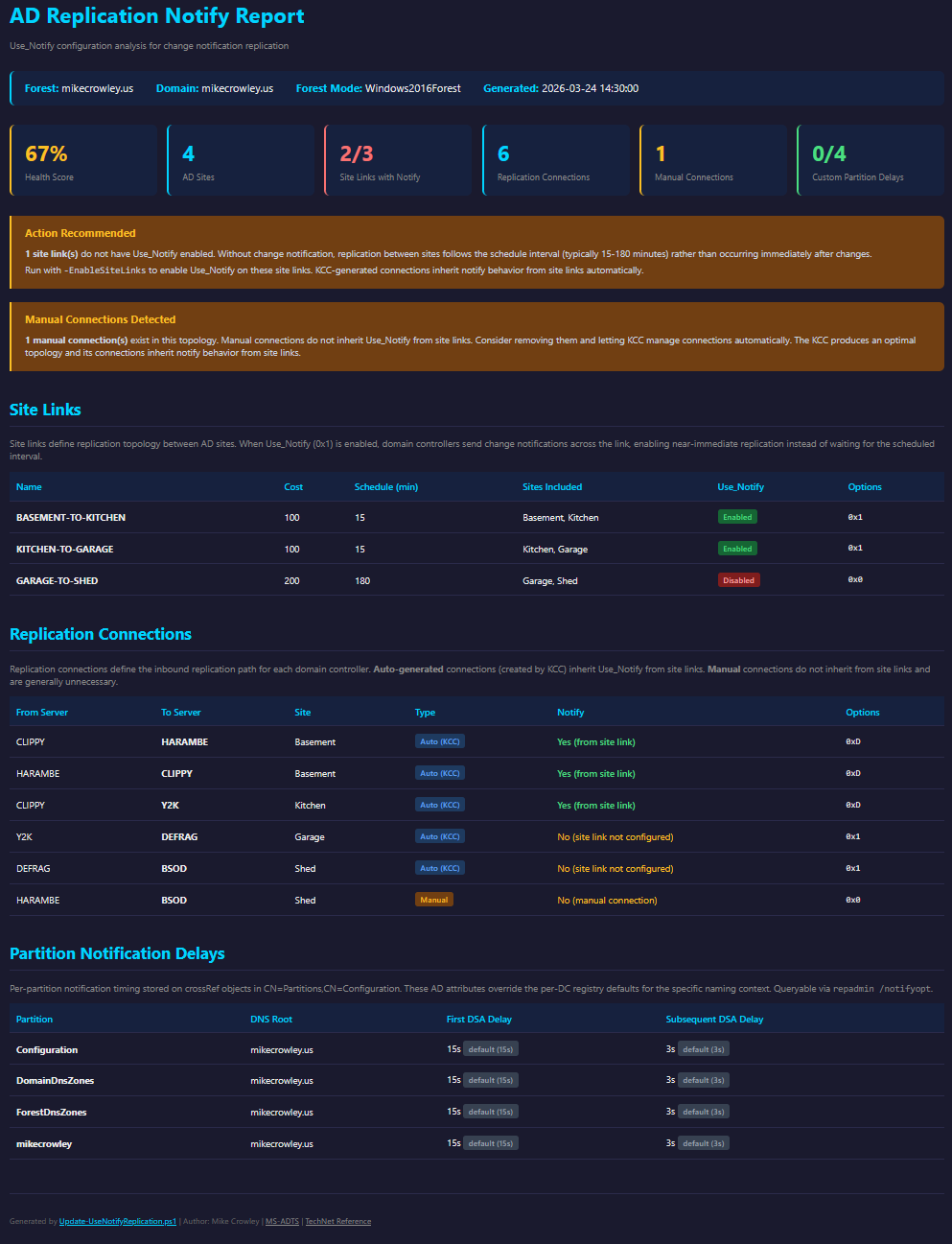
Run it in report-only mode (the default):
| |
Or with DC registry queries:
| |
When you’re ready to enable notification on all site links:
| |
The -EnableSiteLinks parameter sets the Use_Notify bit on each site link’s options attribute using a bitwise OR, preserving any existing flags. KCC-generated connections inherit this automatically.
Manual connections are a different story. They don’t inherit notification settings from site links, so the script also sets OVERRIDE_NOTIFY_DEFAULT | USE_NOTIFY (0xC) directly on manual connections that are missing those bits. Whatever reason you have for statically defining your topology, this respects it. No connections are created, deleted, or retargeted. It just makes them faster.
How It Works (the Short Version)
AD site links have an options attribute that’s a bit field. Bit 0 (0x1) is NTDSSITELINK_OPT_USE_NOTIFY. When set, the KCC propagates this to auto-generated connection objects by setting NTDSCONN_OPT_OVERRIDE_NOTIFY_DEFAULT | NTDSCONN_OPT_USE_NOTIFY (0x4 | 0x8 = 0xC) on the connection.
Manual connections need those bits set individually, which is what the script does. The Ask DS blog documents the procedure if you’d rather do it by hand.
Credit Where It’s Due
None of this is new discovery. The mechanics have been documented for over two decades across several excellent posts:
- Advanced Replication Management from the Windows 2000 Resource Kit – the original documentation of
Use_Notifyand inter-site change notification. - Active Directory Replication: Change Notification & You from the Canberra PFE blog – a practical walkthrough with the important callout that manual connections don’t inherit notification settings.
- Understanding Urgent Replication by Ken St. Cyr – clears up the common confusion between urgent replication and change notification.
- Configuring Change Notification on a Manually Created Replication Partner from the Ask DS blog – the manual connection workaround.
- KB214678 – per-partition notification delay attributes.
- MS-ADTS – the authoritative spec for all the bit flag definitions.
This script just pulls everything together into one report and one toggle.
Get the Script
Update-UseNotifyReplication.ps1 on GitHub. Requires the ActiveDirectory PowerShell module.