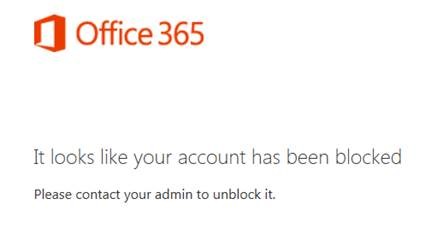
Office 365 account blocked error

DirSync and Disabled Users: The BlockCredential Attribute [Part 1]

In this two-part article, I will describe a scenario in which DirSync sets the Azure BlockCredential attribute of disabled Active Directory users. In Part 1 (below) I explain how the Windows Azure Active Directory Sync tool (DirSync) causes this to happen. Part 2 discusses how to change this behavior. As I’ve been discussing, DirSync can be more complicated than it appears. Even if you are familiar with the miisclient.exe console, some of FIM’s logic is hidden in “Rules Extension” DLL files such as MSONLINE.RulesExt.dll. These files can be reverse-engineered to some degree, however it can be very difficult. ...

October 23, 2013 · 3 min · Mike Crowley
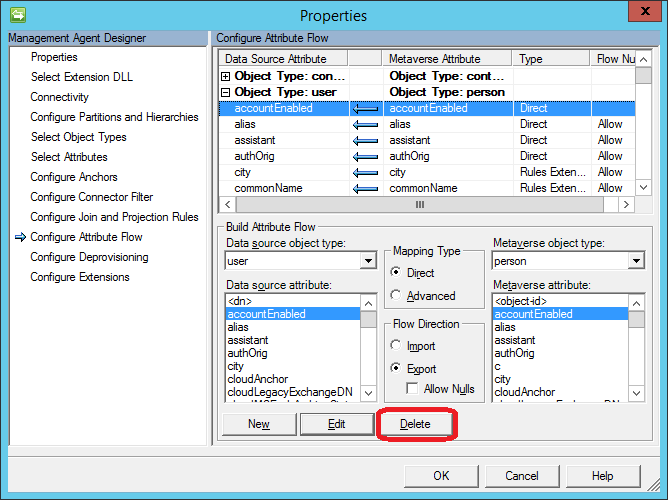
Deleting the accountEnabled attribute flow

DirSync and Disabled Users: The BlockCredential Attribute [Part 2]

In this two-part article, I have laid out a scenario in which DirSync sets the Azure BlockCredential attribute of disabled Active Directory users. In Part 1, I explained how the Windows Azure Active Directory Sync tool (DirSync) causes this to happen. Part 2 (below) discusses how to change this behavior. Last time, we saw that magic a rules extension prevents a user from logging into Office 365 if their on-premises Active Directory account was disabled. Below, I’ll show you how to override this attribute flow, but first a note on Microsoft Support: ...

October 23, 2013 · 3 min · Mike Crowley

DirSync: Determine if Password Sync is Enabled

For those not interested in the complete DirSync Report published last week, you can now run just the Password Hash Sync portion using a script published here: Dirsync: Determine if Password Sync is Enabled. For deployments with remote SQL installations: As with the previous report, note that the script uses the SQL PowerShell Module, which must be present on the computer. If you like this post, you may like my others on DirSync: DirSync tag.

October 22, 2013 · 1 min · Mike Crowley
DirSync busted users CSV report

DirSync "Busted Users" Report

If you administer DirSync for your organization, you likely have seen emails like this, indicating some of your users didn’t sync. It can be a frustrating email, since the “error description” is for some reason blank and the “On-premises object ID” column is not something that’s easy to correlate to a user account within your Active Directory. There are also application event log entries (FIMSynchronizationService #6111 and Directory Synchronization #0), but again these aren’t exactly rich with detail. ...

October 17, 2013 · 3 min · Mike Crowley
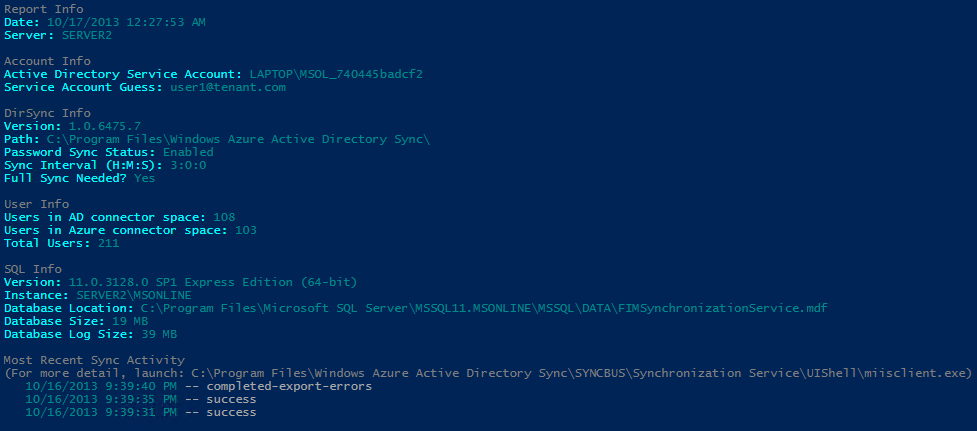
DirSync report script output showing configuration details, user counts, SQL info, and sync activity

DirSync Report

Azure Active Directory Sync (DirSync) seems so simple on the surface doesn’t it? “Next, Next, Finish”, right? Ha! If you’ve ever had to revisit your DirSync server to troubleshoot or make a configuration change, you know there can be more than meets the eye. A lot of useful information happens to be scattered across various registry keys, SQL tables and XML files. If you’re not familiar with the FIM Management Console, and these other locations it might be hard to see what’s going on. ...

October 16, 2013 · 5 min · Mike Crowley
PowerShell console showing Set-Mailbox command to change PrimarySmtpAddress

Converting SMTP Proxy Addresses to Lowercase

Update: Be aware, this script has not been tested with SIP, X400 or other address types. I recently encountered a question in an online forum where someone asked for a script to convert all of their user’s email addresses to lower case values. While this doesn’t affect the message delivery, it can have an impact on aesthetics when the address is displayed in an external recipient’s email client. An Exchange Email Address Policy can do this to some degree, but I wanted to see how it could be done with PowerShell. ...

May 14, 2012 · 3 min · Mike Crowley
Combined PowerShell cmdlet output

Combining PowerShell Cmdlet Results

A common challenge in PowerShell: mailbox sizes are returned with the Get-MailboxStatistics cmdlet but the email address is not. For that, you need another cmdlet, such as Get-Mailbox. So how do you combine results from multiple cmdlets into a single output? The Solution: Custom Objects with PSObject The approach involves: Creating a custom object with defined properties set to null Populating fields by querying different cmdlets Using foreach loops to process multiple users Outputting results as a unified list Example: Mailbox Report Here’s how to build a mailbox report combining email addresses and storage sizes: ...

April 17, 2012 · 2 min · Mike Crowley
Piloting Exchange Online - Cloud Connections session title slide

Cloud Connections Session Slides

Thank you to all attendees of my sessions at the Cloud Connections conference! I’m making the presentation slides available for download: Piloting Exchange Online - A session on deploying Exchange Online Forefront Online Protection for Exchange - Covering email security features For additional speaker materials, visit the DevConnections website at: http://www.devconnections.com/updates/LasVegas_Spring12/Cloud

March 29, 2012 · 1 min · Mike Crowley

Dealing with PST Files

PST (Personal Storage Table) files have several valid uses. Home Outlook users, and those who use IMAP/POP accounts such as Gmail and Hotmail, will always need them. In enterprise environments, they can be used for archiving data in organizations which do not enforce retention policies. In these cases, PST files can be configured through group policy and AutoArchive features. However, in most situations, PST files represent unmanaged storage of email. For regulated enterprises, this can create real compliance problems. When legal discovery is required, PST files scattered across user machines become a nightmare for administrators and legal teams alike. ...

January 30, 2012 · 1 min · Mike Crowley
Office 365 Past, Present and Future webcast

Office 365: Past, Present and Future - a Planet Technologies Webcast

Planet Technologies hosts a free webcast providing tips, insights, and updates on Office 365 and Exchange Online.

November 22, 2011 · 1 min · Mike Crowley