Discussing the Preferred Architecture on the Exchange Server Pro Podcast
I was invited back to the Exchange Server Pro Podcast to discuss Exchange Server’s Preferred Architecture and how to balance best practices against real-world environments.
I was invited back to the Exchange Server Pro Podcast to discuss Exchange Server’s Preferred Architecture and how to balance best practices against real-world environments.
I joined Paul Cunningham on the Exchange Server Pro Podcast to discuss ways to protect Exchange from attack and recent OWA vulnerabilities.

Announcing two speaking sessions at IT/Dev Connections: Exchange Online Protection In-Depth and Mastering PowerShell for Exchange Online.
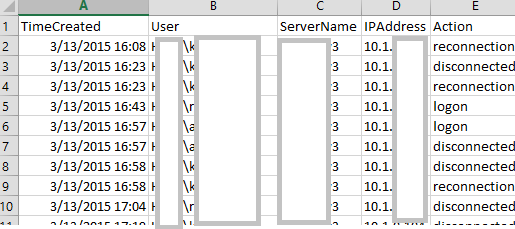
Introducing RDPConnectionParser.ps1 for collecting Remote Desktop session data and an updated RecipientReportv5.ps1 for Exchange recipient analysis.
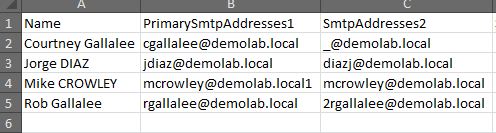
I’ve published an update to the popular Exchange Proxy Address (EmailAddresses) Report script. The updated script includes improved output formatting for both on-screen display and Excel export. Check out the original post for download and usage details.

Update: Be aware, this script has not been tested with SIP, X400 or other address types. I recently encountered a question in an online forum where someone asked for a script to convert all of their user’s email addresses to lower case values. While this doesn’t affect the message delivery, it can have an impact on aesthetics when the address is displayed in an external recipient’s email client. An Exchange Email Address Policy can do this to some degree, but I wanted to see how it could be done with PowerShell. ...

A common challenge in PowerShell: mailbox sizes are returned with the Get-MailboxStatistics cmdlet but the email address is not. For that, you need another cmdlet, such as Get-Mailbox. So how do you combine results from multiple cmdlets into a single output? The Solution: Custom Objects with PSObject The approach involves: Creating a custom object with defined properties set to null Populating fields by querying different cmdlets Using foreach loops to process multiple users Outputting results as a unified list Example: Mailbox Report Here’s how to build a mailbox report combining email addresses and storage sizes: ...
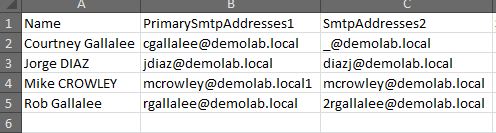
Feb 2021 Edit: Microsoft finally took down the TechNet Gallery. This script is now available on GitHub: RecipientReportv5.ps1 Exchange Server stores alternate email addresses in Active Directory’s multi-valued proxyAddresses attribute. There can be only one uppercase SMTP, and this represents the primary, or “reply to” address. There can be many lower case smtp entries which represent aliases, or alternate addresses. Viewing this information in the Exchange Management Console is straightforward enough: ...
PST (Personal Storage Table) files have several valid uses. Home Outlook users, and those who use IMAP/POP accounts such as Gmail and Hotmail, will always need them. In enterprise environments, they can be used for archiving data in organizations which do not enforce retention policies. In these cases, PST files can be configured through group policy and AutoArchive features. However, in most situations, PST files represent unmanaged storage of email. For regulated enterprises, this can create real compliance problems. When legal discovery is required, PST files scattered across user machines become a nightmare for administrators and legal teams alike. ...
Microsoft releases Exchange 2010 SP2 with Hybrid Configuration Wizard, Address Book Policies, Cross-Site OWA Redirection, and OWA Mini.