
PowerShell console showing Set-Mailbox command to change PrimarySmtpAddress

Converting SMTP Proxy Addresses to Lowercase

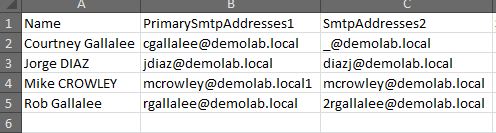
Update: Be aware, this script has not been tested with SIP, X400 or other address types. I recently encountered a question in an online forum where someone asked for a script to convert all of their user’s email addresses to lower case values. While this doesn’t affect the message delivery, it can have an impact on aesthetics when the address is displayed in an external recipient’s email client. An Exchange Email Address Policy can do this to some degree, but I wanted to see how it could be done with PowerShell. ...

May 14, 2012 · 3 min · Mike Crowley
Combined PowerShell cmdlet output

Combining PowerShell Cmdlet Results

A common challenge in PowerShell: mailbox sizes are returned with the Get-MailboxStatistics cmdlet but the email address is not. For that, you need another cmdlet, such as Get-Mailbox. So how do you combine results from multiple cmdlets into a single output? The Solution: Custom Objects with PSObject The approach involves: Creating a custom object with defined properties set to null Populating fields by querying different cmdlets Using foreach loops to process multiple users Outputting results as a unified list Example: Mailbox Report Here’s how to build a mailbox report combining email addresses and storage sizes: ...

April 17, 2012 · 2 min · Mike Crowley
Exchange proxy address report output

Exchange Proxy Address (Alias) Report

Feb 2021 Edit: Microsoft finally took down the TechNet Gallery. This script is now available on GitHub: RecipientReportv5.ps1 Exchange Server stores alternate email addresses in Active Directory’s multi-valued proxyAddresses attribute. There can be only one uppercase SMTP, and this represents the primary, or “reply to” address. There can be many lower case smtp entries which represent aliases, or alternate addresses. Viewing this information in the Exchange Management Console is straightforward enough: ...

April 16, 2012 · 5 min · Mike Crowley

PowerShell Tip - Running a Service Pack Report - Faster

Here’s a quick tip for running a service pack report against your Active Directory servers using PowerShell. Method 1 The first approach retrieves all computer accounts from Active Directory, then filters results: 1 Get-ADComputer -Properties OperatingSystem, OperatingSystemServicePack -Filter * | Where-Object {$_.OperatingSystem -like '*server*'} | Format-Table name, oper* -autosize This technique retrieves all computer objects before filtering. Method 2 The improved approach applies filtering at query time: 1 Get-ADComputer -Properties OperatingSystem, OperatingSystemServicePack -Filter {OperatingSystem -like '*server*'} | Format-Table name, oper* -autosize By making smarter use of the -Filter switch and filtering before retrieval, this can lead to a significant amount of time saved. ...

February 17, 2011 · 1 min · Mike Crowley

Script for Missing UPNs

PowerShell one-liners for both the native AD module and Quest tools to identify users missing UPN attributes and assign them automatically.

December 14, 2010 · 1 min · Mike Crowley

Converting a Mailbox to a MailUser (and Preserving Your Custom Attributes)

A PowerShell script that converts mailboxes to mail-users without losing Exchange custom attributes by capturing and reapplying them during the conversion process.

December 9, 2010 · 2 min · Mike Crowley