
Combined PowerShell cmdlet output

Combining PowerShell Cmdlet Results

A common challenge in PowerShell: mailbox sizes are returned with the Get-MailboxStatistics cmdlet but the email address is not. For that, you need another cmdlet, such as Get-Mailbox. So how do you combine results from multiple cmdlets into a single output? The Solution: Custom Objects with PSObject The approach involves: Creating a custom object with defined properties set to null Populating fields by querying different cmdlets Using foreach loops to process multiple users Outputting results as a unified list Example: Mailbox Report Here’s how to build a mailbox report combining email addresses and storage sizes: ...
April 17, 2012 · 2 min · Mike Crowley
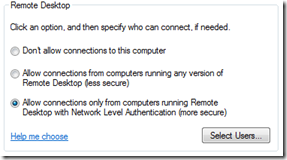
Remote Desktop settings showing Network Level Authentication option

Security Flaw in Remote Desktop

There is a critical Remote Desktop vulnerability that requires immediate patching. Install this update immediately – Microsoft security bulletin MS12-020. This vulnerability affects multiple Windows versions, particularly those exposing Remote Desktop to the internet, such as Terminal Servers. For those unable to patch immediately, I recommend enabling Network Level Authentication (NLA) as a temporary mitigation. To configure NLA, open the Remote Desktop settings and select the option to allow connections only from computers running Remote Desktop with Network Level Authentication. ...

March 13, 2012 · 1 min · Mike Crowley

RSAT for Windows 7 with Service Pack 1 (SP1)

Until now, there were no Remote Server Administration Tools (RSAT) available for Windows 7 SP1. Microsoft released an updated version today which adds this support. You can download it here: Remote Server Administration Tools for Windows 7 with Service Pack 1 (SP1)

April 7, 2011 · 1 min · Mike Crowley

Updated Hyper-V Component Architecture Diagram

Microsoft has released another great poster; this time for the new Hyper-V architecture within Windows 2008 R2 Service Pack 1. You can download it by clicking here: http://www.microsoft.com/downloads/en/details.aspx?FamilyID=93C814D0-FE4B-4D5B-B280-1B9807EC9933&displaylang=en

February 21, 2011 · 1 min · Mike Crowley

How to Set Windows 7's Login Wallpaper with Group Policies

With Windows XP, you could set your own login background colors and/or wallpaper by modifying the values found in the following registry location: HKEY_USERS\.DEFAULT\Control Panel\Desktop. Windows 7 no longer reads this registry key. Instead you’ve got to complete the multi-step process described in [this article](http://technet.microsoft.com/en-us/library/ee ostensibly). While the steps to set a login wallpaper are not complicated, one challenging limitation is the fact your background wallpaper needs to reside on the workstation’s hard drive. Interestingly, this is not true for the user’s wallpaper, as there are GPO settings to point to a network location. ...

February 17, 2011 · 3 min · Mike Crowley

Service Pack 1 for Windows 2008 R2 Now Available for Download

Just a quick note to remind everyone that Service Pack 1 for Windows 7 and Windows 2008 R2 has just now become available for download on TechNet & MSDN. If you don’t have a TechNet or MSDN subscription you should see it on the Microsoft Download sites next Tuesday. [EDIT: Here is the download Link] Be sure to check with each product group before installing this. Obviously it is supported with the OS itself (clustering, Hyper-V, RDS, etc) but you should seek a direct support statement like the one the Exchange group published. ...

February 16, 2011 · 1 min · Mike Crowley

Remote Desktop Services Component Architecture Poster

A comprehensive architecture diagram and poster from Microsoft depicting the Remote Desktop Services technology stack.

August 24, 2010 · 1 min · Mike Crowley

Released: Active Directory Migration Tool (ADMT) version 3.2

The long-awaited Active Directory Migration Tool v3.2 is released for Windows Server 2008 R2, providing integrated toolset for AD domain migration and restructuring.

June 18, 2010 · 1 min · Mike Crowley

Screenshots for Windows Server 2008 R2 RTM In-Place Upgrade

Documenting an in-place upgrade from Windows Server 2008 SP2 Enterprise x64 to Windows Server 2008 R2 RTM with prerequisites and step-by-step screenshots.

August 14, 2009 · 3 min · Mike Crowley

Remotely Enabling Remote Desktop (the 1337 way)

A quick method for remotely enabling Remote Desktop using PsExec, command-line firewall rules, and a registry edit.

March 5, 2008 · 1 min · Mike Crowley