Exchange 2010 Certifications

On occasion I’m asked to comment on topics over at searchexchange.techtarget.com.  Recently I had a discussion with Stephen J. Bigelow, one of their Senior Technical Writers to discuss Exchange certification.

If this is a topic that interests you, see this link:

http://searchexchange.techtarget.com/tip/0,289483,sid43_gci1520343,00.html?track=sy188

I am also to hear your feedback on Exchange certifications.  Are you certified?  Working on it?  Don’t believe in certifications?

Post a comment!

Exchange 2010 SP1 Edge Transport & TMG 2010 SP1 Issue: Fixed.

Microsoft released Exchange 2010 SP1 a few weeks ago and quickly followed up with the following post of oops! known issues: http://msexchangeteam.com/archive/2010/09/01/456094.aspx

One of these issues is that you cannot combine TMG 2010 with Edge 2010 after you apply Exchange 2010 SP1.

It would seem this is now fixed, as Microsoft released “Software Update 1 for Microsoft Forefront Threat Management Gateway (TMG) 2010 Service Pack 1” earlier today.

Personally I’ve been disappointed with the “integration” of TMG and Edge, but if you are using this configuration, go grab this update here:

http://www.microsoft.com/downloads/en/details.aspx?FamilyID=695D0709-0D8B-45EE-AFDB-727C4428CA4D&displaylang=en

For more info on this update see: What’s new in Forefront TMG 2010 Update 1.

Gartner: Exchange 2010 Takes 1st Place

Exchange doesn’t even know what the definition of competition is in today’s enterprise environment!  Ok, calm down you Gmail fanatics!  Winking smile


See this post from Mohamed Baher (an MCS engineer):

I’m happy to announce Microsoft’s strong position in Gartner’s 2010 MarketScope for E-Mail Systems report, in which Microsoft is the only vendor given the top rating of “Strong Positive”. Microsoft is uniquely positioned to deliver e-mail and calendaring technology to customers in the way that makes most sense to them – on-premise, in the cloud, or a combination of both. See the full report at http://www.gartner.com/technology/media-products/reprints/microsoft/vol10/article19b/article19b.html

clip_image001

-Source: http://blogs.technet.com/b/mbaher/archive/2010/08/31/exchange-is-on-top-gartner-s-2010-marketscope-for-e-mail-systems.aspx


From the report itself:

Microsoft released the fifth version of Exchange in November 2009. Exchange 2010, which is starting to increase its market penetration, promises improvements in storage efficiencies, high availability and disaster recovery, as well as more granular administration control and user self-service options. We expect adoption to follow the normal trajectory of previous Exchange releases, peaking at 50% by the end of 2012. The real action, however, is around Microsoft’s Exchange Online service, a subset of the large Business Productivity Online Standard Suite (BPOS) cloud collaboration offering. Throughout 2009 Microsoft added features to the service, and, more importantly, cut the price in half (to $5 per user per month), while quintupling the storage (to 25GB per user) — bringing it close to price and storage parity with Google GAPE. In November 2009, Microsoft said it had 1 million BPOS subscribers. We suspect that number has since doubled.

In 2H10 Microsoft will release the first service pack for Exchange 2010, with an emphasis on archiving, mobility, browser access, resiliency and management services. In 1H11 it will update Exchange Online with the 2010 version of Exchange, which is better suited to working in a multitenant environment. The current 2007 cloud release lacks some essential features, such as password synchronization, a health and performance console, multimailbox search and end-user password resetting. Furthermore, simple e-mail administration requests, such as to track a message, forward mail to an external mail box and disable ActiveSync require submission of a service request to the Exchange Online help desk, which creates operational inefficiencies for customers. Nonetheless, Microsoft continues to prosper in the e-mail market with both its on-premises and cloud options. Longer term, we will see the introduction of numerous hybrid e-mail models from Microsoft, with some mail boxes live in the cloud and others live on-premises. Google has emerged as its closest e-mail competitor, and it will remain so for the next few years.

Rating: Strong Positive

What’s New With Microsoft’s File-Level Antivirus?

———————-

UPDATE 12-16-2010:

RTM’ed today: http://technet.microsoft.com/en-us/evalcenter/ff182914.aspx

Read more here.

———————-

Many of you know that Microsoft’s file-level antivirus product is changing. For those who don’t, here are some high-level points you all should be aware of:

· Forefront Client Security is now Forefront Endpoint Protection (beta)

· Its delivered as a software package via SCCM and SCCM only.

· The management of it is done via SCCM. (Need 2007 R2/SP2 or later)

· It’s free* (provided you own SCCM).

*Last I heard. This isn’t official until it RTMs *It’s free for eCAL users

· You don’t need more servers beyond what you already have for SCCM (Functionally speaking; performance may dictate)

· The client is nearly identical to Microsoft Security Essentials

· The client installer will seek and destroy uninstall Symantec, MacAfee, Trend Micro and old Forefront (FCS) versions if found.

· It will (soon) have pre-canned lists of exclusions for products like Exchange and SharePoint.

For more info you may consider watching this webcast (skip to 13 minutes in to get to the technical stuff):

TechNet Webcast: Forefront Endpoint Protection 2010: Features and Protection Technologies (Level 300)

Exchange 2010 SP1 Hotfix Prerequisites

Like many of you, I was excited to see that Exchange 2010 SP1 was released earlier this week.  I downloaded and and ran it right away on my demo lab environment to be immediately disappointed with the following error:

image

Ok, so Exchange needs some prerequisites, no big deal, right?  I wish they were in the Microsoft Update queue, but hey its brand spanikin’ new so maybe they haven’t gotten to it yet.

I then clicked the link(s) to get the downloads and was greeted again by an error!


image

Ask my question on Bing… that’s rich.

So finally, I TYPED the links, one at a time to finally get to a page with hotfixes for download.  Yeah, I know typing is required from time to time, but don’t tease me with hyperlinks that don’t work Microsoft!  Smile

Anywho, the links are a grab bag of hotfixes.  Some from the MSDN site, others from the Connect site.  Not very reassuring as many of these links are with a lesser SLA from Microsoft…

Once I installed the updates, Exchange 2010 SP1 did install successfully (it took about an hour).  Also worth noting, while it wants a reboot after each one, I just did them all followed by a single reboot at the end.

Finally, to save you the trouble of rounding up all the updates – here is a ZIP I made with them ready to go:

Exchange2010SP1HotFixes.zip

=========UPDATE=========

Looks like you can also get them from this link as well (one at a time): http://technet.microsoft.com/en-us/library/bb691354.aspx

Exchange 2010 SP1 VHD Download

Microsoft was quick to release this one – you can now try Exchange 2010 SP1 without the trouble of even installing it!

Checkout this pre-canned virtual machine of Exchange 2010 with SP1:

http://www.microsoft.com/downloads/details.aspx?FamilyID=53F7382A-3664-4DE3-8303-31E514D69F02&displaylang=en

You’ll need Hyper-V to use this machine, as Virtual PC doesn’t support x64 guests.

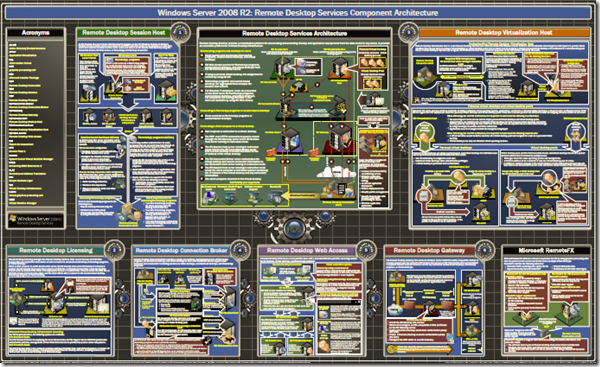
Remote Desktop Services Component Architecture Poster

Remote Desktop Services (formally Terminal Services) has dramatically improved and matured starting with the Windows 2008 launch.  In many ways, it allows Citrix installations to be replaced by native Windows technologies.

You can read more here: http://microsoft.com/rds

This week Microsoft released a very nice diagram/poster of the technology.  Check it out here:

http://www.microsoft.com/downloads/details.aspx?FamilyID=9BC943B7-07C5-4335-9DF9-20E77ED5032E&displaylang=en 

image

BlackBerry Desktop Software Version 6 Released

For a while now I have limped along with Blackberry Internet Service and the Blackberry Desktop Software for Contact Synchronization.  My company uses hosted email that does not offer BES functionality.  :(  But I can’t help myself, I just love the Blackberry devices too much!

What makes this worse, is that for TOO long, the desktop software did not work with Outlook 2010image

Well, it still doesn’t work with x64, but now it at least supports Outlook 2010 x86.


Currently, BlackBerry Desktop Manager 5.0.1 and Desktop Software 6.0 do not support Microsoft Outlook 2010 64-bit version for mailbox connectivity and synchronization of organizer data such as Calendar, Contacts, Tasks, and Memos. BlackBerry Desktop Software 6.0 provides support for Microsoft Outlook 2010 32-bit version only. Support for Microsoft Outlook 2010 64-bit version will be available in 2011. (–Source)


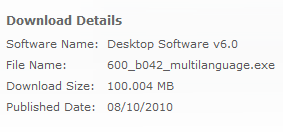
You can get it yourself by clicking here.  Sadly, the “check for updates” option in the Desktop Manager 5x doesn’t seem to be aware of the 6x version.

Additionally, you can View BlackBerry Desktop Software v6.0 User Guide.

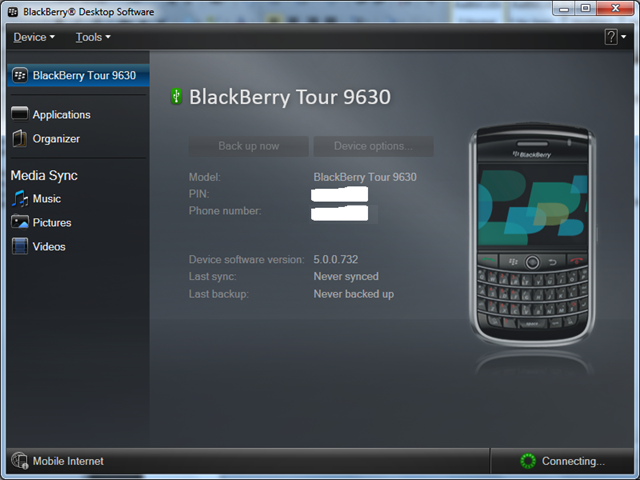
Below is a sample screenshot:

image

Delayed SMTP Acknowledgement

Exchange 2010 introduces a nifty new feature called Shadow Redundancy. Being one of the bigger changes in this version, it is well documented and discussed.

This post is on Delayed SMTP Acknowledgement, which is a subset of this feature – not Shadow Redundancy as a whole.  However to fully grasp what I will be discussing, it’s important to understand a few basics about Shadow Redundancy to appreciate the purpose and spirit of Delayed SMTP Acknowledgement.

I encourage you to first travel to some of the above links, but most importantly, understand a few points:

Exchange 2007 sent messages to recipients through Transport Servers (Hub/Edge). If a Transport server were to fail with messages in its queue, these messages are lost.  Generally, this is only a small amount of data loss, but loss is loss, and we want to avoid that!

To mitigate this risk you could:

     A. Attempt to replay transaction logs (recover the database) from a separate disk; but this assumes the failure was limited to a single disk or database. More importantly the queue database uses circular logging by default so you cannot assume this approach will work anyway.

     B. Backup your Queue databases. This sounds simple on the surface, but the database is changing each time a message is sent and received. Restoring a queue database is likely irrelevant unless you had truly continuous backups.

     C. Leverage the Transport Dumpster. This feature is used for LCR/CCR environments only, but might resubmit messages in some scenarios.

Exchange 2010’s Shadow Redundancy sends the message down multiple SMTP paths (different Hub or Edge Transport servers) so that if the destination does not confirm successful delivery, another Transport server is able to submit the message. This means, we can sustain a failure of a Transport server/database, provided you have multiple servers.

Let’s take a look at a modified TechNet diagram to see an example:

Shadow Redundancy Example

Note that the Hub server sends the same message to two Edge servers. The lower edge server only submits the [shadow] message if it learns that the top edge server failed to do so.

Please understand I’m greatly simplifying this process. To fully understand all the steps involved, read the documentation linked above.

Ok, so now that we understand Shadow Redundancy, let’s ask the obvious question:

What about servers that do not support Shadow Redundancy?

A very valid concern, as this of course includes all previous versions of Exchange and most servers on the internet today.

Enter: “Delayed Acknowledgement”.

Delayed Acknowledgement is an attempt made by Exchange 2010 Transport servers to protect messages received from less sophisticated mail servers.

This is accomplished by making the sending server wait while the message is delivered behind the scenes of the 2010 environment.

Let’s explore this in more detail via the below illustration:

(Click for higher quality)

Logic Flow Chart

As you can see, this is a best effort attempt to protect email that does not support full Shadow Redundancy. This protection covers the scenario where your receiving Transport server fails after it accepts the message from the sending server, but before it delivers it to the user’s mailbox. If this failure were to happen, the original sending server would never get it’s acknowledgement and therefore it would be that server’s behavior to queue or resubmit the message.

See the below image to visualize this scenario:

(Click for higher quality)
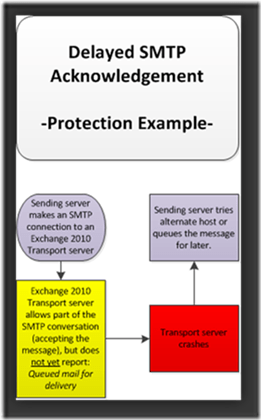
Protection Example

So as you can see, while this isn’t as robust as true Shadow Redundancy, it does attempt to ensure messages are not lost when a Transport server fails.

Now that we see how it works, I’d like to point out some of the gotchas and configurable options:

As we saw in the first diagram, it’s possible for the sending server to think a message was delivered if the background submission takes more than 30 seconds. Because of this, messages that naturally take this long anyway (due to network conditions or latency, or whatever) will not be protected. Now, you can change 30 seconds to something higher, but you risk the sending server timing out on you.

There are additional reasons the Transport server might let the sending server “off the hook”, including:

· Submission queue in suspended state

· Message is in deferred state due to transient error

· Delivery queue is in retry or suspended state

· Delivery queue exceeds DelayedAckSkippingQueueLength value

· Message is routed to unreachable queue

So in closing, Delayed SMTP Acknowledgement is not as robust as it’s bigger brother Shadow Redundancy, but does a best-effort to protect messages in transport. You can configure the MaxAcknowledgementDelay via the Set-ReceiveConnector command.

You shouldn’t have to, but if you need to disable this feature, do so via:

Set-ReceiveConnector "ConnectorName" -MaxAcknowledgementDelay 0

See this sample scenario from TechNet:

Assume that all messages are typically delivered within 20 seconds in your environment, but due to performance requirements, you don’t want to delay acknowledgement more than 15 seconds for messages received from the Internet. After analyzing the message flow, you conclude that 95 percent of messages are delivered within the 15 second interval. This example configures the Receive connector from the Internet to delay acknowledgement for only 15 seconds. In this scenario, your environment provides shadow redundancy for 95 percent of messages received from the Internet.

Set-ReceiveConnector "From the Internet" -MaxAcknowledgementDelay 00:00:15.

References:

· Understanding Shadow Redundancy

· Configure Shadow Redundancy

· TechNet Webcast: Deploying and Managing Microsoft Exchange Server 2010 Transport Servers

=========UPDATE=========

New to SP1:

Shadow Redundancy Promotion

Exchange 2010 introduced the shadow redundancy feature to minimize the loss of any message during delivery after it enters the Exchange organization. Exchange Transport servers achieve this by using the shadow redundancy SMTP protocol extension.

However, in any organization Exchange Transport servers need to communicate with other third-party SMTP servers that may not support the shadow redundancy protocol. This is especially true with Edge Transport servers that handle message traffic with various hosts on the Internet. When receiving messages from hosts that don’t support shadow redundancy in Exchange 2010 RTM, Transport servers delay sending acknowledgement to incoming messages until they verify final delivery within the organization. However, when a specific threshold was reached, the Transport server issued an acknowledgement even if final delivery wasn’t verified. This presented a scenario where messages received from hosts that don’t support shadow redundancy can be lost in transit.

To address this issue, a new feature called shadow redundancy promotion is introduced in Exchange 2010 SP1. When faced with the scenario described above, instead of issuing an acknowledgment without delivery confirmation, a Transport server now routes the message to any other Transport server within the site so that the message is protected by shadow redundancy.

-Source: http://technet.microsoft.com/en-us/library/ff629378.aspx

SBS “7” Preview

Looks like Microsoft has spoken the first words about the upcoming version of Small Business Server (SBS) 7!

Check out the details here:

View article…

  • Windows Small Business Server (SBS) “7” Preview: The next version of Windows Small Business Server will include a richer remote access experience, as well as updates to all of the component software in the suite to the latest versions (Windows Server 2008 R2, Exchange Server 2010 SP1, SharePoint 2010 Foundation, Windows Server Update Services 3.0 and SQL Server 2008 R2). As a result, small business customers will find significant security and management enhancements as well as much richer features for providing file-and-print, email and Internet services to employees. SBS 7 will support up to 75 users.
  • Windows Small Business Server (SBS) Code Name “Aurora” Preview: A new edition of Windows Small Business Server, Aurora is an affordable, easy to use “first server” option for small businesses that will be the company’s first to deliver both traditional and cloud capabilities. With SBS Aurora, customers will be able to better protect their business data through automated backup and restore capabilities, easily organize and access business information from almost anywhere and run a variety of business tools and software. SBS Aurora will support up to 25 users.

Respect the DAG!

image Exchange 2010’s Database Availability Group configuration allows you to build a highly available Mailbox Server environment without being an expert in clustering technologies; but did you know that DAGs install and configure Failover Clustering behind the scenes?

So while you don’t need to be an expert in Failover Clustering, or even remember to install it – you should at least know that it exists and treat it as such.

There are many videos and articles on the DAG configuration, but I wanted to point out a few common mistakes I’ve seen.  The New DAG wizard doesn’t adhere to these best practices, so manual fix-up is required (If you aren’t using EMS).


Below are 4 tips:


  • When you create a Windows Cluster, a computer account is created and in Active Directory!  You should treat this account like you would any other server object.
    image This could mean lots of things, but at the least, you should move the object to the same OU as the mailbox server accounts.  By default the DAG account will be placed in the “Domain\Computers” container.  You wouldn’t want a weird GPO messing with your Exchange environment!
  • Set a static IP.  You’ll learn this real quick 🙂 if your server’s subnet doesn’t have DHCP; but if it does, you may go on for a long time not realizing you aren’t in control of the IP used for DAG communication.  If you created your DAG in PowerShell (hey, I like PS too, but there’s a GUI so I use it!) you could have used the following commands:
    New-DatabaseAvailabilityGroup -Name DAG1 -DatabaseAvailabilityGroupIPAddresses 10.2.3.4
    If you used the wizard, the option to use a static IP is not exposed.  To fix this you can either use the abovementioned command, but with “Set” instead of “New” – or you can go right into the Failover Cluster Manager MMC.image
    Start, Administrative Tools, Failover Cluster Manager.  Expand Cluster Core Resources (collapsed in the center by default).  Expand your DAG name and double-click IP Address.image

Select the Static IP Address bubble and fill out the appropriate IP address.


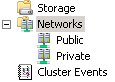
  • Rename your DAG Networks.  By default they are named generically, but you can fix this by clicking the Database Availability Groups tab under the global mailbox configuration.  You can also use the Set-DatabaseAvailabilityGroupNetwork cmdlet.  If you don’t know what to name them, I’d suggest simply calling the one facing the Client Access Servers “Public” and the 2nd one “Private”.  Of course the name itself isn’t too important, as long as it is meaningful to you!
  • Rename your Cluster Networks.  This is not required, but I like a tidy shop, so I always rename the “Cluster Networks” to match the DAG network.image

I hope you find these four tips useful.  They are not required, but based on my experience I can say they will make your life easier.  And a little disclaimer before you go:  This post is not intended to educate you on creating a DAG; rather point out a few best practices often overlooked.  For complete guidance see this great step-by-step guidance from MVP Henrik Walther here.


Have a happy and safe Independence Day!!

Microsoft Network Monitor 3.4 Released

Many of my colleagues use tools like Wireshark or Ethereal to capture network packets, but I can honestly say that I prefer Microsoft’s “native” tool over the 3rd party alternatives.

Early on, there was no competition.  NetMon was lacking in many key features, but over the years (especially since version 3x) it’s gotten a lot better.

My favorite feature is NetMon’s ability to group traffic by the application that generated it.  To my knowledge, Wireshark and Ethereal cannot do this.  The feature is of course useful when you want to quickly locate traffic from a source without first filtering on ports and addresses.

image

So as mentioned in the title, version 3.4 of Network Monitor was released today!  You can download it for yourself here:

http://www.microsoft.com/downloads/details.aspx?FamilyID=983B941D-06CB-4658-B7F6-3088333D062F&displaylang=en

image

If you have an earlier version installed, you do not need to uninstall.  The 3.4 installer will upgrade it.

For more information about Network Monitor, including this version, stop by the NetMon blog here: http://blogs.technet.com/b/netmon

I have not seen any release notes published on the web, but you can find them, including a “What’s new” within the program installation directory.

I’ll save you the trouble by listing them here:

—————————————–
What’s New in Network Monitor 3.4
—————————————–

• User Interface Refresh: The Network Monitor UI has evolved. New features
  have been added and previously hard-to-find features have been made more
  readily available:
  • Parser Configuration Management: Parsers are now installed with profiles
    that allow you to easily switch between parser configurations with the
    Parser Profiles toolbar button.  These configurations are also cached,
    removing the need to recompile when you switch between them.
  • Column Management: Network Monitor will automatically choose a column layout
    based on the type of file being opened. This column layout is applied to the
    Frame Summary Window. This layout can be modified and saved for future use.
    In addition, two extra layouts for HTTP and TCP diagnostics are included.

  • Color Rules: Network Monitor can now save sets of Color Rules to files for
    easy sharing. You can also right-click in the Frame Summary and Frame Details
    windows to add a new Color Rule.

  • Window Layout Dropdown: The new window layout dropdown provides multiple
    configurations for window arrangement. You can move windows by holding down
    the Shift key while clicking on their title bars. Arrangements are saved
    for each of the three layout options. The Restore Default Layout option
    will reset the currently selected layout back to the default.
  • “Live” Experts: Experts can now be run during a live capture session. Also,
    experts that have been recently installed now appear automatically in the
    Experts menu, without requiring you to open another tab.
  • Fixed-Width Font: You can now use a fixed-width font in the Frame Summary window.
  • Auto-Apply Aliases: Aliases are now automatically applied and re-applied
    when created using the right-click add-to-alias feature.
• High Performance Filtering: Network Monitor will now enter a high-performance
  capturing mode when you specify fully qualified capture filters with certain
  fields in the UI or nmcap (e.g. Frame.Ethernet.IPv4.TCP.Port == 8080).
• UTC Timestamps: Network Monitor will now capture and save Time Zone related
  information in a trace. By default, traces opened with Time Zone information
  will automatically have times adjusted to your local Time Zone. The original
  time or Time Zone can be viewed by adding the “Time and Date” column or viewing
  the Properties under the File menu.
• 802.11n & Raw IP Frame Support – Network Monitor now supports monitor mode on
  802.11n network on Microsoft Windows Vista SP1 and later operating systems as
  well as Raw IP Frames on Microsoft Windows 7.

• Process Tracking in NMCap: It is now possible to capture process tracking
  information in the NMCap command-line tool. It will automatically be enabled
  when using a filter, or can be manually enabled using the “/CaptureProcesses” flag.

Independence day is coming!

Declaration Of Independence

I’m getting excited about my upcoming annual cook-out / bonfire / backyard fireworks!  Last year we went through 96 burgers and at least twice three times that many beers!  😉


If you too love to enjoy the grill and celebrate with great food, check out my brother’s site!


(Click the image above to enlarge a great, high-res picture of the Declaration of Independence!  or here for a more readable version)

www.chicagosteak.com

RibeyeChicago Steak Company12 (5.3oz) Gourmet Burgers


What are blogs for, if not shameless plugs!?  8)

Released: Active Directory Migration Tool (ADMT) version 3.2

The long awaited 2008 R2 version of ADMT has been released to the web.  You can download it here:

http://www.microsoft.com/downloads/details.aspx?FamilyID=20C0DB45-DB16-4D10-99F2-539B7277CCDB&displaylang=en

A good read, if you’re looking at using this tool is:

Active Directory Migration Guide

&

Active Directory Migration Tool (ADMT) Guide: Migrating and Restructuring Active Directory Domains

However for complex migrations/transitions/whatever I prefer the Quest Migration Manager for Active directory.

Here is some info from the ADMT download page:

The Active Directory Migration Tool version 3.2 (ADMT v3.2) provides an integrated toolset to facilitate migration and restructuring tasks in an Active Directory Domain Services infrastructure.

Overview

The Active Directory Migration Tool version 3.2 (ADMT v3.2) simplifies the process of migrating objects and restructuring tasks in an Active Directory® Domain Service (AD DS) environment. You can use ADMT v3.2 to migrate users, groups, service accounts, and computers between AD DS domains in different forests (inter-forest migration) or between AD DS domains in the same forest (intra-forest migration). ADMT can also perform security translation (to migrate local user profiles) when performing inter-forest migrations.

System Requirements
  • Supported Operating Systems: Windows Server 2008 R2
  • ADMT can be installed on any computer capable of running the Windows Server 2008 R2 operating system, unless they are Read-Only domain controllers or in a Server Core configuration.
  • Target domain: The target domain must be running Windows Server 2003, Windows Server 2008, or Windows Server 2008 R2
  • Source domain: The source domain must be running Windows Server 2003, Windows Server 2008, or Windows Server 2008 R2
  • The ADMT agent, installed by ADMT on computers in the source domains, can operate on computers running Windows XP, Windows Server 2003, Windows Vista, Windows Server 2008, Windows 7, and Windows Server 2008 R2.
Additional Information

  • PES v3.1 is a separate download also available on the Microsoft Download Center. See the Related Downloads section below.
  • ADMT v3.2 is the last version of the tool which will support migration operations involving Windows Server 2003, Windows Server 2008, or Windows Server 2008 R2 source domains, target domains, or domain controllers.
  • To obtain customer support if you are performing migration operations involving NT 4.0 (with SP4 or higher) or Windows 2000 Server source domains, or domain controllers, please contact your Microsoft Services representative or visit http://www.microsoft.com/microsoftservices.