A New Version Of Office 365’s Directory Synchronization Tool Has Arrived!

Most medium and large organizations using Microsoft’s Office 365 service will also be using “DirSync” to provision and manage user identities. Until now, DirSync has been based on ILM 2007 FP1, which is a functional, but older application, with no x64 support. This means when installing DirSync onto a server, you had to go out of your way to deploy the Windows Server 2008 operating system since the Server 2008 R2 OS is x64 only.

ILM was replaced by Forefront Identity Manager (FIM) 2010, which uses the x64 CPU architecture and as therefore Windows Server 2008 R2 as well.

imageToday (finally), Microsoft announced DirSync can now be downloaded for use with the 64-bit architecture.  This is great news for new Office 365 customers – no more legacy software needed.  However, this does raise a question for existing DirSync users: How do we migrate?

You should check out the announcement for details, but essentially, you reformat and rebuild.  Wait!  Before you start muttering nasty things about Microsoft – the new installation of DirSync will find all of the identities currently in Office 365 and match them up with the appropriate Active Directory accounts in your environment.  There is no downtime for the users.

Exchange Connections Slide Decks

Thanks to all who attended my sessions at Exchange Connections in Las Vegas this week!

As promised, I have uploaded the slides. You can download them here:


If you’re looking for slides from other presenters, you can find them here:


Hosting Exchange 2010 without the /hosting switch

The EHLO blog posted an important announcement today regarding Exchange 2010 in hosted environments.  Previously, for Microsoft to support your multi-tenant deployment of Exchange 2010, you had to build a whole new forest and use a special setup.com /hosting installation process.  There were other significant limitations as well.

The strict support statement, combined with Microsoft’s release of Office 365 really came as a one-two punch to some of the smaller companies who wished to host Exchange but could not afford to employ developers and/or take the risk of forfeiting support from Microsoft.  It seemed like Microsoft may have lost some love for their hosting partners.

With the Exchange 2010 SP2 update (scheduled to launch later this year), you will be able to host a multi-tenant environment with a regular deployment of Exchange.  This is made possible by the new Address Book Policies and specific configurations to be documented with the SP2 release.

Personally, I’d look at this very carefully before deploying any new /hosting environments.  This (SP2) seems like a much simpler deployment to maintain.

How to Connect the BlackBerry Device Simulator to a BlackBerry Enterprise Server (Screenshots)

Let me start off by acknowledging this isn’t exactly an original topic.  Many have discussed it in the various BlackBerry-related forums and RIM has an official article on it (albeit very old).  I even found a video with similar instructions for BES 4x.  What I couldn’t find however was an illustrated and current (BES 5x) walkthrough of testing “Enterprise Activation” from a simulated handheld; so if that’s what you are after, please read on…


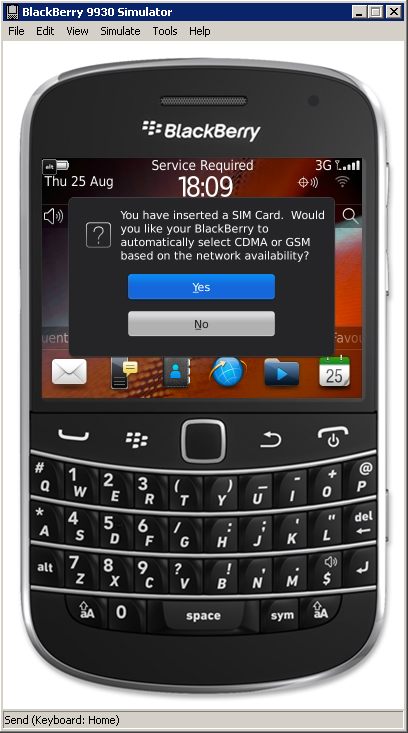
Before I get into the steps themselves let’s take a look at one of the simulators, which is based on Blackberry OS 7 device software:

You should know this software is free!  You can download it here after you complete the registration.BlackBerry Device Simulator

Once you run through the application setup, you’re greeted with this intuitive interface

———>

Within, you can do all softs of fun things such as navigate the menus, take screenshots, simulate use of the touchscreen, compass and more.

BlackBerry Device Simulator Device Manipulator

What we’re after today however is Enterprise Activation (the process of associating the handheld with a Blackberry Enterprise Server).

Initially, I was discouraged to see Enterprise Activation was not working via the normal process:

Activation Request failed.  A service connection is unavailable


But after some research I learned it can be completed via simulating a USB connection to the BAS interface instead.

To accomplish this, follow the below steps:

(Click images to enlarge)

1. Launch the simulator. You may need to resize the screen and click through a few pop-ups to get to the device’s main screen. BlackBerry Device Simulator Pop-ups
2. From the Simulate menu button, select USB Cable Connected. USB Cable Connected
3. From the same computer, launch the BAS web site. Accept certificate warnings and install ActiveX CAB files as prompted. Depending on your browser configuration you may need to adjust the security settings.

BlackBerry Administrative Service

The default URL is: https://server.domain.local:443/webconsole/login

Internet Explorer blocked an ActiveX control, so this page might not display correctly.

(Bad)

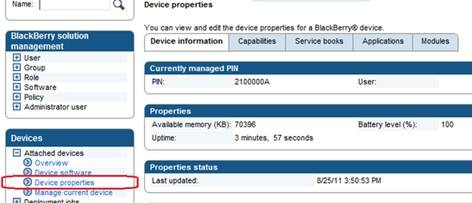
4. You can verify the device is properly connected by expanding the Devices menu tree on the left and selecting Device properties. BAS Device properties
5. Before you can begin the  EA process, you need to create a user. Select a user from your directory that does not currently have a Blackberry device. To do this, expand the BlackBerry solution management menu tree on the left and select Create a user.

6. Once on this screen, simply select Search from the right. It will pull up all of the users in your Exchange Server environment.

BAS Create a user
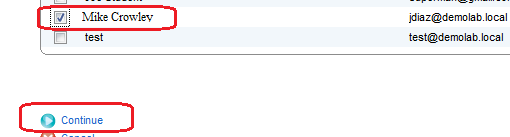
7. Select a test user and click Continue. BAS User Selection
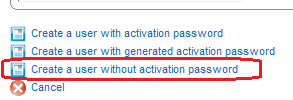
8. On the following screen, select Create a user without activation password. BAS Create a user without activation password
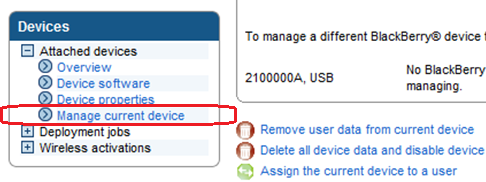
9. Expand the Devices menu tree on the left and select Manage current device. BAS Manage current device
10. Select Assign the current device to a user. BAS Assign the current device to a user
11. Click Search once again and select the test user.

12. Click Associate user.

BAS Associate user
13. Once complete, notice a new envelope icon on the simulator (covered with a briefcase). This represents the new EA relationship. Blackberry device main screen
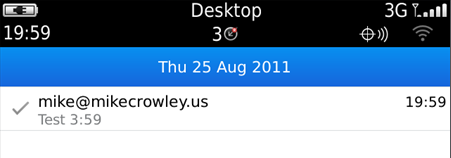
14. Touch the new envelope and compose a test message. Blackberry device test message
15. Verify it reached its destination and that the message was saved to your test user’s Sent Items folder. OWA Sent Items folder


And we’re done! I hope this was helpful.

Speaking at Exchange Connections: November 2nd & 3rd in Las Vegas, Nevada

DevConnectionsWould you like an excuse to get out of the office for a few days?  When is the last time you learned something new?  Or how would you like an opportunity to share fresh ideas on the technology you’re passionate for?

Or heck, maybe it’s just been a while since you’ve been to Vegas?  Winking smile

Join me and other Microsoft enthusiasts at the DEVCONNECTIONS conference this fall!  This semiannual event covers many tracks from Visual Studio to Exchange Server to Microsoft’s hot new cloud products: Azure and Office 365.

In addition to attending some great sessions, I will also be presenting on two topics:

Exchange Online: Administration
Be careful not to fool yourself; Exchange Online (part of Office 365) offloads infrastructure management, but as an administrator, you are still responsible for the administration of your user mailboxes, Internet mail flow, message tracking and more! This session introduces you to the various administrative interfaces of Exchange Online, Forefront, RBAC, provisioning and other operational topics.
Exchange Online: Understanding Archiving and Compliance
Thinking of moving to Office 365? Whether you are aiming for a period of coexistence or a complete migration, your archival and compliance requirements are not going away! In this session we examine the features and functionality that Microsoft provides around retention, archiving, and search.


Sign up here, and use the SPKR discount code to save $50.

And if that’s not incentive enough, I’ll close by reminding you that Halloween in Las Vegas should prove to be very interesting…

A Picture Says a Thousand Words: TechNet Forums Now Supports Images

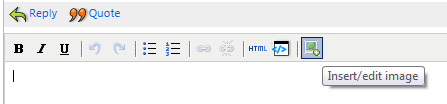
While replying to a question on the TechNet support forums, I noticed a little green button that wasn’t there before:

Green Image Upload Button

It seems that Microsoft has finally created a way to upload pictures to the forums!  No more feeling around in the dark, trying to guess what’s wrong.

As the seasoned forum participants will tell you, this isn’t entirely new.  You’ve always been able to add an image if it was hosted by another site via editing the thread’s HTML manually, but the introduction of this button will now allow you to store images with Microsoft; no 3rd party site needed.  And more importantly, this will allow anyone to upload a screenshot.

Once you upload an image, there are controls to drag it into place, as well as controls to resize.

I’m curious to see how this goes.  While I think it’s a needed addition, I would imagine there is a high risk of abuse, or worse, administrators accidently exposing sensitive information about their environments.


Do you use the TechNet forums?  If no, why not?  What other forums do you like?

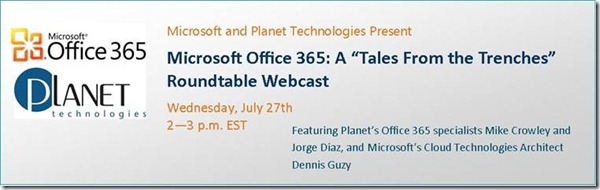
Microsoft Office 365: A “Tales From The Trenches” Roundtable Webcast

Register for the 7/27/11 Webcast!

The long awaited release of Microsoft Office 365 has arrived. Now what? As nice as it would be to flip a switch and perform your migration, we all know the process is a bit more involved. So, how do you get there from here?

Join Planet and Microsoft experts who’ve been in the trenches participating in thousands of migrations to O365 to date. In this one hour interactive roundtable, they’ll share insights into:

  • Lessons learned from the early Beta adopters regarding the biggest challenges and hurdles to deployment
  • The critical need to address the underlying health of your Active Directory PRIOR to migration, and specific steps for cleaning up your environment
  • Security issues and features
  • Realistic migration timeline expectations
  • A head-to-head analysis of O365 and the competition

There is no cost to participate but space is limited so register today!

REGISTER NOW


About Planet Technologies

Planet Technologies is recognized world-wide as a leading expert in the integration and customization of Microsoft technologies, architecture, security and management consulting.  We offer Microsoft based solutions around business intelligence, CRM, collaboration and messaging, cloud services, desktop deployment, SharePoint solutions, unified communications, virtualization and more. Visit us a www.go-planet.com

ExRCA Now Supports Office 365

imageThe Exchange Microsoft Remote Connectivity Analyzer has been an essential tool for Exchange administrators since it’s initial release.  This site will attempt to connect to your environment through a variety of methods to help you ensure all is well, or troubleshoot issues related to client connectivity. 

If you haven’t seen this tool, you should definitely check it out:

http://www.TestExchangeConnectivity.com (or the short link: http://exrca.com)

Last week, Microsoft updated this tool to include support for Office 365.  While you wouldn’t actually be troubleshooting Microsoft’s Exchange environment, this new tab allows you to validate your URLs and configurations related to the “Rich-Coexistence” scenario.

Another interesting fact: Microsoft announced plans to incorporate other products into this tool, beyond Exchange Server. 

For a complete list of changes in this version, see the release notes.


Exchange Remote Connectivity Analyzer

Office 2010 SP1 Released

EDIT: Download Office 2010 SP2 here.

—————

Office 2010 Service Pack 1 was released to Windows Update today.  You can download it for yourself here:

List of all Office 2010 SP1 packages

There are 3 primary enhancements for Outlook 2010 (Who uses Word and Excel anyway Winking smile ):

  • Outlook 2010 SP1 includes Office 365 support.
  • Outlook 2010 SP1 can be set to always use the default sending account.
  • Fixes an issue in which the snooze time does not between appointments.
      You can see the complete list of fixes (on all of the Office 2010 products) via

KB 2460049

    .
    Once the installation finished, I was a bit concerned because I didn’t see “SP1” appended to the version number, but after clicking “Additional Version and Copyright Information” I was reassured:

About Microsoft Outlook

About Microsoft Outlook (SP1 MSO)

As you can see version Service Pack 1 is “14.0.6023.1000”

Talking IRM on RunAS Radio

Recently, I had a chance to chat with Richard Campbell and Greg Hughes on the popular RunAS Radio Show.  The topic was Information Rights Management and how it relates to Exchange Server.  This was also a feature I demonstrated on stage at the Exchange Connections event in Orlando earlier this year.

If you’re not sure what IRM is or does, or if you wish to learn more about it, be sure to tune in on May 4th to listen to show #210!

https://www.runasradio.com/Shows/Show/210

Major PKI Breach

There has been a security breach identified with many Comodo Certificates. 

Comodo CEO Melih Abdulhayoglu calls the breach the certificate authority’s version of the September 11th terror attacks!


If you’re running Windows you need to apply this patch immediately.

http://support.microsoft.com/?kbid=2524375

If you’re using Mac or Linux, this affects you too, however I do not have links for you at this time.